

Quick answer: If your GMB phone number verification keeps failing, the most common reason is that your phone number has no presence on other trusted websites. Google can’t confirm it’s real. The fix is building citations on 7 to 10 business directories with your exact NAP (Name, Address, Phone) before you try again. This is not a bug. It’s a trust problem. And citations are how you fix it. |
Phone verification on Google Business Profile sounds like it should be simple. Google calls your number, you enter a code, you’re verified. Five minutes.
In practice, it fails constantly for new businesses, and nobody tells you why. The call doesn’t come, or the code doesn’t work, or you get stuck in a loop where no verification method seems to go through. You’re not doing anything wrong. The issue is that Google doesn’t yet trust your phone number.
This post explains exactly why that happens and how to fix it. The process comes from a real case: a clothing shop in Pune whose GBP phone number verification failed repeatedly until we solved it with citations. The same process has worked for clinics, salons, and home service businesses since then.
First, What Is GMB Phone Number Verification?
When you create or claim a Google Business Profile, Google needs to confirm that your business is real and that you actually represent it. This is the verification step, and it’s required before your listing goes live on Google Maps and local search.
Google offers several verification methods. Phone call or SMS is the fastest and most businesses try it first. Postcard by mail takes 5 to 14 business days and requires a physical address. Video verification involves recording a short walk-through of your premises. Email verification is available only for certain account types. And live video call with a Google representative is usually a last resort.
GMB phone number verification fails more often than any of the others. The reason has nothing to do with your phone number being invalid. It has everything to do with Google’s trust system.
Why Google Business Profile Phone Verification Fails
Before Google will call or text a number to verify it, its systems check whether that number has any traceable presence online. Think of it as a quick background check. If the number exists on trusted platforms, Google proceeds. If the number appears nowhere online, or appears inconsistently, Google hesitates or blocks verification entirely.
This is not a bug or a policy problem. It’s Google protecting its directory from fake listings. Spam businesses try to verify with random numbers. Google’s way of filtering them out is by cross-checking numbers against citations.
The specific reasons verification fails
The most common reason is that your phone number has no online presence. If your number isn’t listed anywhere outside your GBP, Google has no external source to confirm it’s a real business number.
Inconsistent NAP across platforms is the second reason. If your business name, address, or phone number appears differently on different websites, such as your number with a country code on one platform and without it on another, Google’s automated systems see conflicting signals and won’t verify.
Using a mobile number for a business that Google expects to have a landline can also trigger failure. This is especially common for home-based businesses and newer startups.
Virtual phone numbers and call tracking numbers get flagged frequently. If your number is tied to a VoIP service provider and not consistently listed online as a real business number, verification will usually fail.
Finally, brand-new businesses with no digital footprint at all struggle the most. Google’s trust system is calibrated around established businesses. A listing with zero citations, no website, and no social media presence looks like a potential spam account regardless of whether the business is legitimate.
Why Citations Fix the Problem
A citation is any place online where your business name, address, and phone number appear together. Business directories, review platforms, social profiles, and niche listing sites all count. When Google sees your number listed consistently across multiple trusted sources, it gains confidence that the number belongs to a real business.
This is Google’s Entity Trust system at work. It’s the same reason that a well-established business with 50 Justdial reviews and a Sulekha listing gets verified instantly, while a business that created a GBP profile yesterday and has no other online presence gets stuck.
You don’t need 50 citations. In most cases, 7 to 10 well-structured citations on high-authority platforms is enough to cross the trust threshold and allow phone number verification to proceed. Here’s exactly how to do it.
Step-by-Step: How We Fixed Phone Verification for a Clothing Shop in Pune
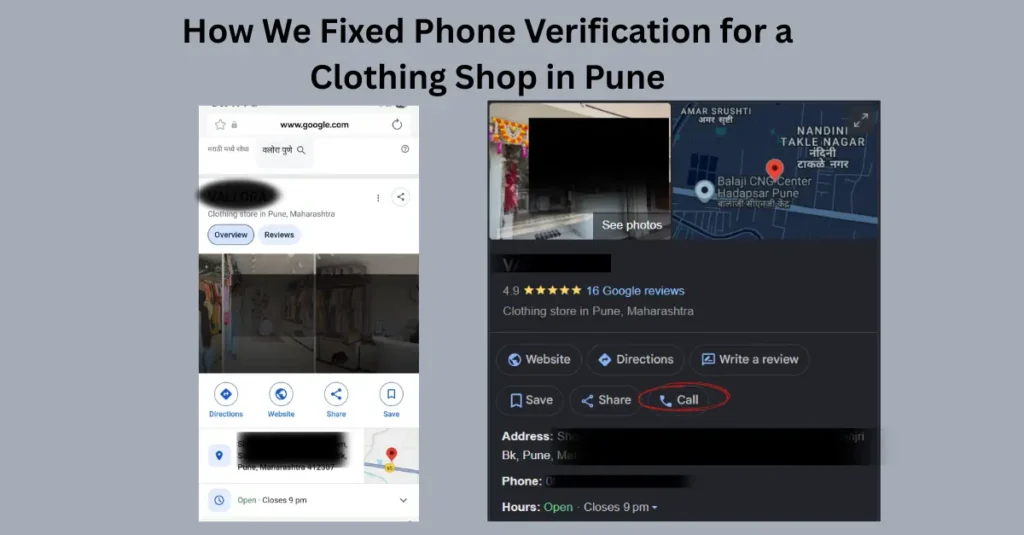
A clothing shop in Pune came to us after 3 weeks of failed phone verification attempts. They had a Google Business Profile created, photos uploaded, and services listed. Every time they tried phone verification, either no call came or the code failed. Video verification was an option they were dreading.
Here’s exactly what we did.
Step 1: Audit and standardise the NAP
Before creating any citations, we locked down the exact format of the business’s Name, Address, and Phone number(NAP). This matters because inconsistency across citations defeats the purpose.
We used the business name exactly as it appears on their signage. For the phone number, we used the full format with country code: +91 followed by the 10-digit number. For the address, we used the complete address with pincode. We then used this exact format on every citation without variation.
One detail that trips up many businesses: mobile numbers should always include +91 in Indian citations. Some directories display it differently, but enter it with +91 in the form fields.
Step 2: Create citations on these 8 platforms

Platform | Link |
Justdial | |
Sulekha | |
IndiaMART | |
YellowPages | |
Hotfrog | |
Facebook Page | |
Bing Places |
We listed the shop on these platforms in this order, prioritising the ones that index fastest and carry the most trust for Indian local businesses.
Justdial: submit via justdial.com/business-registration. Verify with mobile OTP so the listing goes live immediately, not after manual review. This is the single most trusted Indian local directory for Google’s systems.
Sulekha: create a free business listing at sulekha.com. Fill in all fields, add at least 2 photos, and use the same phone number format.
IndiaMART: even if you’re not a product business, a free company profile here carries strong trust signals. Go to indiamart.com and create a seller/company profile.
Google Maps (separate from GBP): if you haven’t already claimed your business on Google Maps directly, do so. This creates a separate citation signal.
Bing Places: go to bingplaces.com and create a listing. Bing’s directory is cross-referenced by Google’s systems even though most searches happen on Google.
Facebook Business Page: create a Facebook Page for the business at facebook.com/business. Add the exact same phone number, address, and business name. Facebook profiles are heavily trusted because they require real account ownership.
Yellow Pages India: list at yellowpages.in. This is older but still indexed by Google and counts as a trust signal.
Hotfrog India: list at hotfrog.in. Takes 10 minutes and goes live within 24 hours.
Step 3: Wait for indexing
Some listings go live instantly with OTP verification. Others take 2 to 5 days to be indexed by Google. We waited 5 days after completing all 8 citations before reattempting phone verification.
To check if Google has picked up the citations, search for the business name and phone number together in quotes on Google. If the citations are showing up in search results, Google has indexed them. That’s when to retry verification.
Step 4: Retry phone verification
After the citations were indexed, we logged back into Google Business Profile at business.google.com and clicked Verify by phone. The call came within 30 seconds. The code worked on the first attempt. The profile went live that evening.
The entire process from audit to verified profile took 8-10 days. Compare that to the 3 weeks of failed attempts before citations were built.
When Phone Verification Still Fails After Citations
Citations solve the problem in most cases. But sometimes phone verification remains unavailable even after building citations, particularly for home-based businesses without a listed address, service-area businesses that don’t show a physical location, and businesses using VoIP or virtual numbers.
In these situations, here are the alternatives in order of speed.
Postcard verification
Google mails a postcard with a verification code to your listed business address. It takes 5 to 14 business days to arrive. When it arrives, log in to Google Business Profile and enter the 5-digit code. This is the most reliable method for businesses that can’t get phone verification to work and have a physical address.
Video verification
Google has increasingly offered video verification as an alternative. You record a short video showing your business premises, signage, and location. You don’t need to appear on camera. The video is reviewed by Google, which takes 3 to 5 business days. This is a good option for businesses with clear physical premises that Google can confirm.
Email verification
Available only for some accounts, typically those that were transferred from an older Google My Business setup or have other Google products connected. If email verification appears as an option, use it since it’s instant.
Live video call with Google support
If all other methods fail, you can request a live verification call with a Google representative through the Google Business Profile support chat. They’ll ask you to show your premises, signage, and a government-registered document confirming the business address. This is the last resort, but it does work.
What Else Citations Do for Your Business
Building 8 to 10 quality citations does more than fix phone verification. Once your GBP is verified and live, those same citations become part of your local SEO foundation.
Citations are one of the main ranking signals for local search. When Google is deciding which 3 businesses to show in the Local Pack for a search like ‘tuition classes near me in Pune,’ it compares how consistently each business’s information appears across trusted directories. More consistent citations, combined with a well-optimized GBP and genuine reviews, generally means better ranking.
The tuition academy we verified through this process went from not appearing in local search at all to appearing in the top 5 local results for their main keyword within 6 weeks. The citations were a significant part of that. The other parts were completing the GBP profile fully, adding weekly posts, and starting a review generation system.
Citations also generate direct leads. Justdial and IndiaMART both send inbound enquiries to listed businesses. Several of the academy’s leads in the first month after listing came directly from Justdial, with no additional ad spend.
Citation Best Practices to Follow
- Use the same NAP format everywhere without variation. Even small differences like ‘Road’ versus ‘Rd’ or ‘+91’ versus ‘0’ before the number create inconsistency that works against you.
- Use a real, working phone number that you answer during business hours. A number that rings out or goes to voicemail for weeks signals to Google that the business may not be active.
- Add photos to every citation where the platform allows it. Listings with photos get more clicks and signal more credibility to Google.
- Do not create duplicate listings. If you already have a Justdial listing from a previous attempt, claim and update it rather than creating a new one. Multiple listings for the same business on the same platform confuse Google and can hurt your trust score.
- Track all your citations in a spreadsheet: platform name, URL of your listing, login email, date created, and verification status. You’ll need this when you update your phone number or address later, so you can update all citations simultaneously and maintain consistency.
- Review and update your citations every 6 months. Phone numbers change. Businesses move. Outdated citations with old information actively hurt your local SEO over time.
F.A.Q.
The most common reason is that your phone number has no presence on other trusted websites. Google cross-checks your number against business directories and citations before it trusts it enough to call. If your number doesn’t appear on any platforms outside your GBP, verification will usually fail. Build citations on 7 to 10 business directories using your exact NAP format, wait 5 days for indexing, then retry.
In most cases, 7 to 10 strong citations on trusted Indian directories like Justdial, Sulekha, IndiaMART, Facebook Business, and Bing Places is enough. The quality and consistency of the citations matters more than the quantity. One well-structured Justdial listing that’s been OTP-verified and live for 5 days is worth more than 20 low-quality directory submissions.
Yes. Google accepts mobile numbers for GBP phone verification in India. The number must be a real, working number that you can answer. It should include the country code (+91) in all your citations. If phone verification keeps failing with your mobile number, try building citations first and retrying after 5 to 7 days.
NAP stands for Name, Address, and Phone number. NAP consistency means these three pieces of information appear in exactly the same format across every online platform where your business is listed. Even small differences like street abbreviations, missing country codes, or slight name variations create conflicting signals that reduce Google’s trust in your listing. Choose one format and use it everywhere.
Typically 4 to 7 days after your citations go live and get indexed by Google. Some citations like Justdial with OTP verification go live instantly. Others take 2 to 3 days to be indexed. Search for your business name and phone number in quotes on Google to check which citations are showing up. Once you see 5 or more citations in search results, retry phone verification.
Try postcard verification next. It takes 5 to 14 business days to receive the postcard at your business address. If that isn’t an option because you don’t have a listed physical address, use video verification. Record a short video showing your premises and signage. Google reviews it within 3 to 5 business days. As a last resort, contact Google Business Profile support and request a live verification call.
Need help getting your Google Business Profile verified?
SpyraaBizz handles GBP setup, verification, and optimization for small businesses in Pune. Free consultation.