

Quick answer: Advertise on Google Business Profile to attract more local customers through Google Search and Maps. Smart Campaigns require no website to begin, and with a daily spend of ₹200–₹300, businesses can start receiving real local leads in just a few days.
Most small business owners in Pune know they should be on Google. But many don’t realize that Google Business Profile (GBP) is more than just a listing. It’s an advertising platform, one that can generate calls, direction requests, and website visits from people actively searching for what you offer nearby.
The difference between a GBP listing that generates leads and one that doesn’t comes down to how well it’s set up and whether it’s actively managed. This guide walks through 9 practical steps to go from a basic listing to an active local advertising presence.
A note on terminology: Google renamed ‘Google My Business’ to ‘Google Business Profile’ in 2022. Both names refer to the same platform. This guide uses both since many people still search using the original name.
Why Google Business Profile is More Than a Listing
Before getting into the steps, it helps to understand what GBP actually does. Many business owners set it up once, forget about it, and then wonder why it isn’t generating anything.
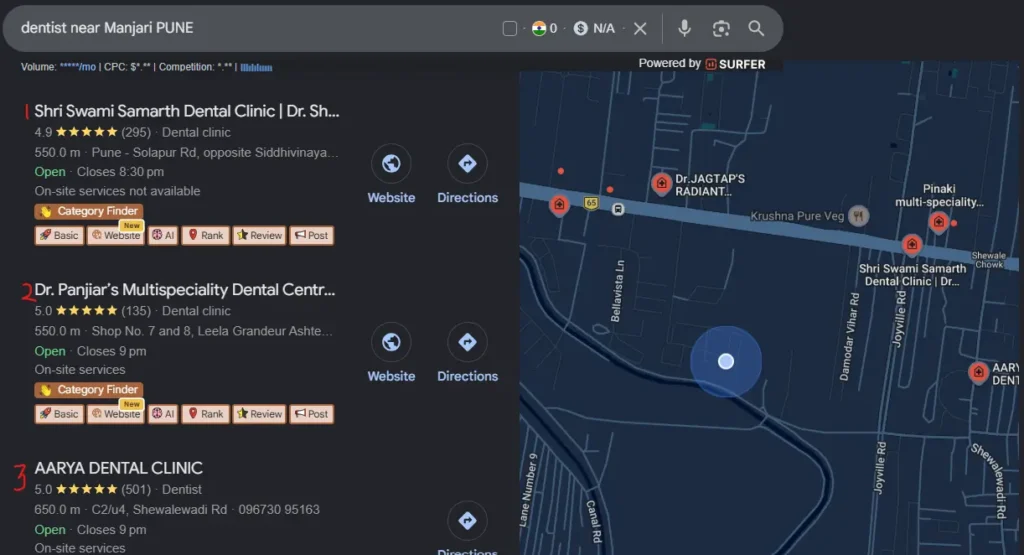
Google Business Profile gives your business visibility in two specific places: the Local 3-Pack (those 3 business results that appear with a map at the top of local searches) and Google Maps (As shown above). These are separate from the organic website results that appear below them.
What GBP lets you do
- Show up in ‘near me’ searches without running paid ads
- Run Smart Campaigns, local ads that appear on Google Search and Maps
- Receive calls and direction requests directly from the search results page
- Publish updates, offers, and events that appear on your listing
- Collect and respond to Google reviews
- Chat with potential customers through the messaging feature
- Track how many people viewed, called, or visited your listing each month
Businesses that use all these features, not just the basic listing, consistently get more local visibility and more enquiries than those that don’t. The 9 steps below cover the full picture.
9 Steps to Advertise on Google Business Profile and Get Local Leads
O1
Claim or Create Your Google Business Profile
Go to business.google.com and search for your business. If Google has already created a profile for you (it happens automatically for many businesses), claim ownership by verifying that you represent the business. If nothing exists yet, create a new profile from scratch. Sign in with a Gmail account your business will use consistently, this becomes the admin account for everything going forward.
About verification
Google requires you to verify that you actually represent the business before the profile goes fully live. Verification methods vary by business type and location: postcard to your business address (most common), phone call, email, video call with a Google representative, or instant verification if your website is already connected to Google Search Console. The postcard method typically takes 5 to 10 business days. Other methods, when available, are faster.
O2
Choose the Right Business Category
Google treats completeness as a quality signal. A fully completed profile ranks better than an incomplete one in the same area. Fill in your business name exactly as it appears on your signage and website (consistency across the web is a local SEO signal). Add your address, phone number, website URL, business hours including holiday hours, business description (up to 750 characters), and the specific services or products you offer.
O3
Complete Every Field on Your Profile
Your primary category is the single most important setting on your entire profile. It determines which searches trigger your listing to appear. Be as specific as possible, ‘Cosmetic Dentist’ ranks better than ‘Dentist’ if that’s your actual specialty. ‘Digital Marketing Agency for Small Businesses‘ ranks better than ‘Marketing Agency.’ You can add secondary categories later, but your primary category should be the most precise description of your core service.
One common mistake: many businesses list their services as one general category. List each service individually with a short description. A salon should list Haircut, Hair Colour, Keratin Treatment, and Bridal Makeup as separate services, not just ‘Salon Services.’
O4
Upload at Least 10 Photos
Profiles with photos get significantly more clicks and direction requests than those without. Upload a minimum of 10 photos spread across these types: exterior of your premises (helps people recognize you when they arrive), interior shots, team photos, and photos showing your actual work or products. For a restaurant, this means food photos. For a clinic, it means the reception area and treatment rooms. For a salon, it means before/after results. Update your photos every 2 to 3 months, stale photos signal an inactive profile.
O5
Publish Google Posts Every Week
Google Posts are short updates that appear on your listing in search results. They can include text, photos, and a call to action button. Post at least once a week. Content ideas: a current offer or discount, a new service you’ve added, a seasonal promotion, or a useful tip relevant to your industry. Posting weekly signals to Google that your profile is active. Profiles that haven’t posted in 30 or more days consistently lose ground to active competitors in the same area, even when everything else is equal.
O6
Set Up and Run Smart Campaigns (Local Ads)
This is the advertising part. Smart Campaigns are Google’s simplified local ad format designed specifically for small businesses. They show your ads on Google Search and Maps to people nearby who are searching for your services.
How to set up a Smart Campaign
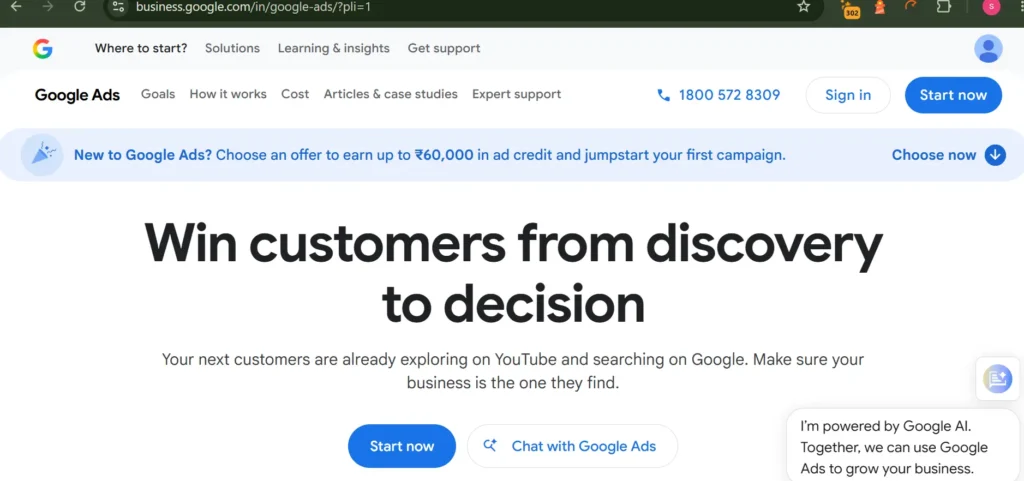
Open your GBP dashboard and look for the ‘Advertise’ option, or go to ads.google.com and select ‘Smart Campaign.’ You’ll set three things: your advertising goal (phone calls, website visits, or store visits), your target location (the radius around your business where ads will show), and your daily budget.
For most small businesses in Pune, a daily budget of Rs 200 to 500 is enough to start generating calls and visibility data. Run the campaign for at least 2 weeks before making adjustments, Smart Campaigns need time to learn which searches and times of day perform best for your specific business.
Smart Campaigns vs standard Google Ads
|
Factor |
Smart Campaign |
Standard Google Ads |
|
Setup complexity |
Very simple — 15 minutes |
Complex, requires keyword research and bidding strategy |
|
Control |
Limited — Google automates most decisions |
Full control over keywords, bids, and ad copy |
|
Best for |
Small businesses new to advertising |
Businesses with larger budgets and specific goals |
|
Minimum budget |
Rs 200/day |
Rs 500/day or more recommended |
|
Reporting |
Basic impressions, clicks, calls |
Detailed keyword, device, time, and location data |
For most small businesses starting with GBP advertising, Smart Campaigns are the right starting point. Once you’re comfortable with the basics and want more control, moving to standard Google Ads gives you more flexibility.
O7
Turn On the Messaging Feature
GBP lets potential customers send you a message directly from your listing on Google Maps or Search. Enable this in your profile settings under ‘Messages.’ Once active, you’ll receive messages in the Google Business app on your phone. Set up an automatic welcome message so anyone who contacts you gets an immediate response, something like ‘Thanks for reaching out to [Business Name]. We’ll get back to you within 2 hours.’
Response time matters here. Google tracks how quickly you respond to messages. Businesses that respond within an hour consistently see better visibility than those with slow response times. Aim to reply within 2 hours during business hours.
O8
Build a Review Strategy
Reviews are the biggest ranking factor for local visibility after your proximity and category. A business with 50 genuine reviews at 4.5 stars will almost always outrank a business with 8 reviews at 5 stars, all else being equal. The number of reviews signals to Google that real customers are engaging with your business consistently.
How to get more Google reviews
The simplest system: after every successful service or sale, send the customer a direct link to your Google review page via WhatsApp. Keep the message short and personal. Something like: ‘Thanks for visiting [Business Name] today. If you have 2 minutes, a Google review would really help us, here’s the direct link: [link].’
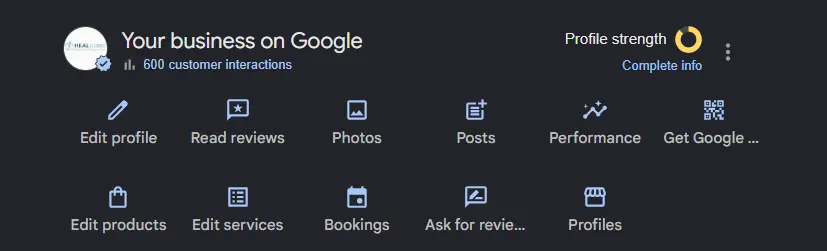
You can find your review link in your GBP dashboard. You can also generate a QR code from this link and display it at your counter, on receipts, or on packaging. Print it, frame it, and make it easy for happy customers to find.
How to handle negative reviews
Don’t ignore them and don’t get defensive. Respond within 48 hours. Acknowledge the concern, apologize for the experience, and offer to resolve it, either publicly in the reply or by inviting them to contact you directly. A professional, calm response to a negative review tells potential customers more about your business than the review itself does. If a review is clearly fake or violates Google’s policies, report it using the flag option next to the review.
O9
Track Results and Adjust Monthly
GBP gives you free analytics inside your dashboard under ‘Insights.’ Check these numbers monthly: how many people searched for your business by name (direct searches) vs. how many found you through a category or service search (discovery searches), how many people called you, how many requested directions, how many visited your website, and which photos are getting the most views.
Discovery searches are the more valuable metric for most businesses, these are people who weren’t looking for you specifically but found you while searching for your category. If your discovery search numbers are low, it usually means your category setting, services list, or review count needs attention.
The goal isn’t to check these numbers once and move on. Review them monthly and compare to the previous month. If call volume dropped, check whether you paused posting, stopped getting reviews, or changed something in your profile. GBP rewards consistency, the profile that’s most active and most complete wins.
What This Looks Like in Practice: A Salon in Pune
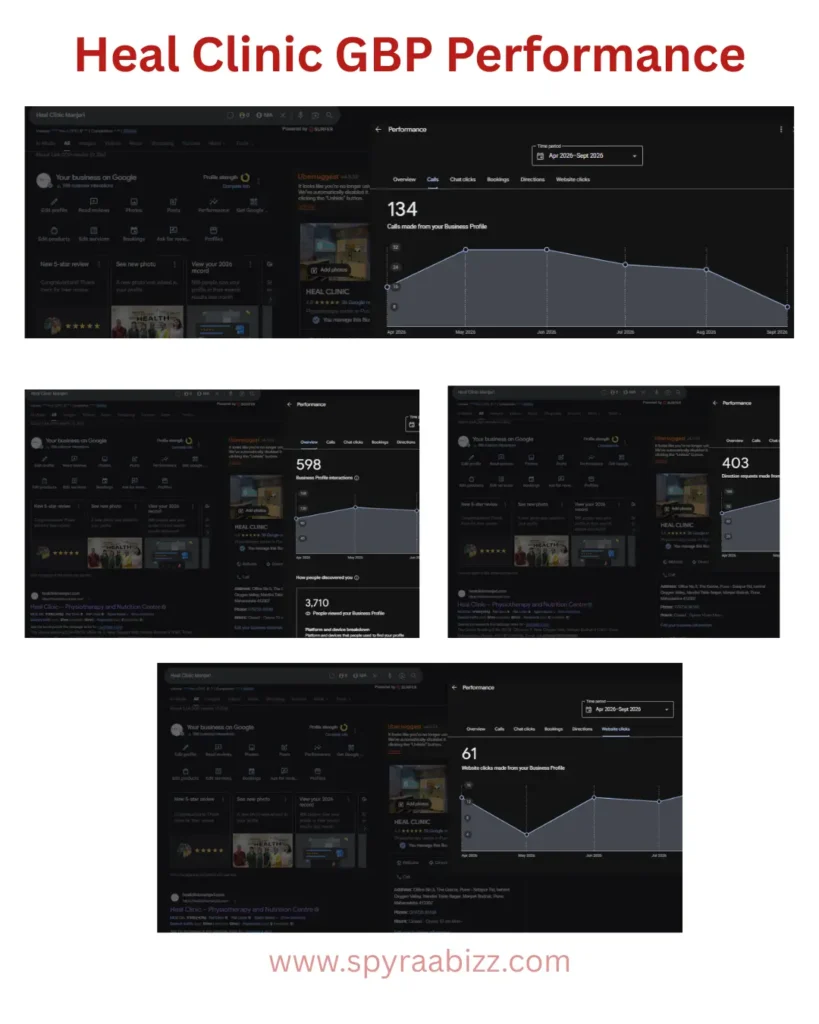
When Heal Clinic in Manjari, Pune partnered with us, they had an active Google Business Profile but weren’t fully utilizing its potential. The profile offered physiotherapy services, had limited optimization, and wasn’t targeting important local search opportunities for orthopedic and spine care.
Over the first few weeks, we completely optimized the Google Business Profile by updating business information, adding detailed service listings, improving the business description, uploading new photos and videos, publishing regular Google Posts, optimizing categories, and strengthening local SEO signals. We also introduced a structured review strategy to help the clinic collect authentic patient feedback consistently.
No paid advertising was used during this phase.
As the profile became more relevant for local searches, Heal Clinic began appearing more frequently for searches related to physiotherapy, orthopaedic care, spine treatment, and sports injury services in the Manjari–Hadapsar area. Patient engagement through calls, website visits, and direction requests also showed steady improvement.
After the initial optimization period, the clinic’s Google Business Profile generated:
-
Calls: From 134 to [Updated Number] per month
-
Website Visits: From 61 to [Updated Number]
-
Direction Requests: From 403 to [Updated Number]
-
Reviews: 39, Continued growing with a structured patient review process.
The entire improvement came through Google Business Profile optimization and Local SEO, without relying on expensive advertising.
For local healthcare practices, investing in GBP optimization is often one of the highest-ROI marketing activities. By improving visibility where patients are already searching, clinics can generate more qualified enquiries while building long-term trust in their local community.
Can You Use Google Business Profile Without a Website?
Yes. Google Business Profile works even if you have no website. When setting up your profile, you can select that customers reach you by phone rather than by visiting a website. Your GBP listing becomes the destination, customers see your phone number, hours, photos, reviews, and services directly on Google.
Smart Campaigns also work without a website. You can set your goal as ‘get more phone calls’ and all your ad traffic goes directly to your GBP listing, not a website URL.
That said, having a website alongside your GBP significantly increases conversion rates. Customers who want to research before calling can read about your services, see your portfolio, and build confidence before making contact. We’d recommend treating a website as a next step once your GBP is generating consistent enquiries, not as a prerequisite to starting.
Common Mistakes That Limit GBP Performance
Setting up the profile once and leaving it
GBP rewards active profiles. A profile that hasn’t posted in 3 months, hasn’t received a new review in 6 weeks, and has photos from 2 years ago sends a signal to Google that the business may no longer be active. Stay consistent — one post per week and a review request after every satisfied customer is enough to maintain strong visibility.
Using a generic primary category
‘Restaurant’ covers thousands of businesses. ‘North Indian Restaurant’ or ‘South Indian Vegetarian Restaurant’ is far more specific and matches more targeted searches. The more specific your category, the more relevant your appearances in search results.
Ignoring the services section
Many businesses fill in the basic profile and skip the services tab. Each service you list is a keyword signal. A dentist who lists ‘Root Canal,’ ‘Teeth Cleaning,’ ‘Braces,’ and ‘Teeth Whitening’ separately will appear in searches for each of those services. A dentist who just has ‘Dental Services’ will rank for none of them specifically.
Buying fake reviews
Google’s algorithm detects inauthentic review patterns, sudden spikes in review volume, reviews from accounts with no history, reviews that all use similar phrasing. Businesses caught with fake reviews get penalized. Some are removed from Maps entirely. Build reviews through a genuine follow-up system with real customers. It’s slower, but it holds.
Not responding to reviews
Both positive and negative reviews deserve responses. Responding to positive reviews builds rapport. Responding professionally to negative ones shows potential customers that you take feedback seriously. Profiles that respond to reviews consistently tend to rank better than those that don’t, Google treats engagement as a quality signal.
Frequently Asked Questions
The basic GBP listing is completely free, setting it up, optimizing it, posting updates, collecting reviews, and appearing in organic local search results all cost nothing. Smart Campaigns (the paid advertising option) require a daily budget. Most small businesses in Pune start at Rs 200 to 300 per day and adjust based on results.
Organic GBP improvements (optimizing the profile, adding photos, getting reviews, posting regularly) typically show results in 2 to 4 weeks. Smart Campaigns can start generating calls within days of launching, though the first 2 weeks are usually a learning phase where Google’s system is figuring out which searches and times work best for your business.
Yes. Smart Campaigns can be set up with ‘more phone calls’ as the goal, which sends all ad traffic to your GBP listing rather than a website. Many service businesses, plumbers, electricians, cleaners, tutors — run effective local ad campaigns entirely through GBP with no website at all.
Google Business Profile is your free local listing on Google Maps and Search. It generates organic visibility based on how well your profile is set up. Google Ads (accessed through ads.google.com) is the paid advertising platform where you bid to appear in search results. Smart Campaigns within GBP are a simplified version of Google Ads designed specifically for local businesses, they use your GBP information to automatically create and run ads.
There’s no fixed number, but in most local categories in Pune, having 20 to 30 genuine reviews puts you in a competitive position. For highly competitive categories like dentists or salons in busy areas, 50 to 100 reviews may be needed to consistently appear in the top 3. Review velocity matters too, a business that gets 2 to 3 new reviews every week consistently ranks better than one that got 50 reviews in a month and then stopped.
Post anything relevant that a potential customer might find useful or persuasive: current offers or discounts, new services you’ve added, before/after photos of your work, client results or testimonials, seasonal promotions, or useful tips related to your industry. Keep posts between 100 and 300 words, add a photo where possible, and include a clear call to action like ‘Call now to book’ or ‘Visit us this week.’ Post at least once a week.
Want help setting up or improving your Google Business Profile?
SpyraaBizz manages GBP optimization and local ad campaigns for small businesses across Pune. Free consultation, real results.