
Quick Answer: AI Assistant is a new traffic source in GA4 that shows up when a real visitor lands on your website after asking an AI tool like ChatGPT, Perplexity, Gemini, or Copilot a question and clicking the link it gave them. It’s separate from Organic Search, Direct, and Referral traffic, and it simply means AI tools are already discovering, trusting, and recommending your website to real people.
Did you open your Google Analytics (GA4) recently and notice something new? A small label saying ‘AI Assistant’? If yes, don’t worry. Nothing is wrong. Nothing is broken. This is real, and it’s actually pretty exciting.
Let me explain this to you in the easiest way possible. No confusing words, no technical talk.
What Does 'AI Assistant' Mean as a Traffic Source in GA4?
In simple words: it means a real person visited your website because an AI tool sent them there.
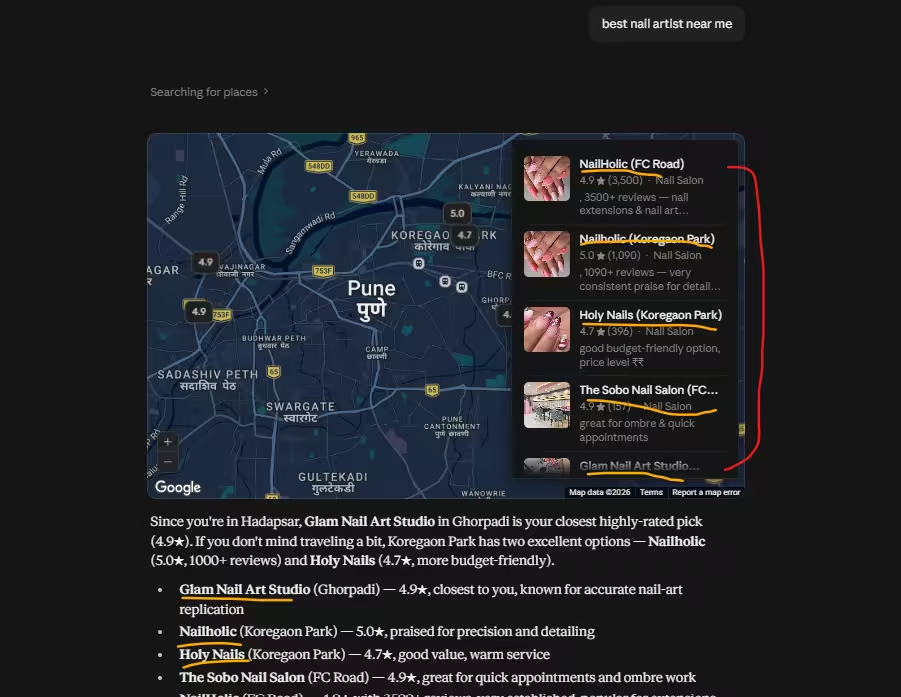
Earlier, when someone landed on your website, GA4 would put them in buckets like ‘Organic Search’ (they searched on Google and clicked your link), ‘Direct’ (they typed your URL directly), or ‘Referral’ (they came from another website’s link). Now there’s a new bucket. When someone asks a question to an AI tool, like “best physiotherapy clinic near me” or “Affordable digital marketing agency in Pune” and that AI tool gives an answer with your website as a source, and the person clicks through to your site… GA4 now tags that visit as coming from an “AI Assistant.”
So this traffic source is simply GA4’s way of saying: “Hey, this visitor didn’t come from a normal Google search. An AI assistant sent them here.”
Which AI Tools Fall Under This Traffic Source?
This isn’t just one tool. AI Assistant as a category usually covers traffic coming from
- ChatGPT (when it shares links in its answers)
- Perplexity (which is built almost entirely around citing sources)
- Google Gemini
- Microsoft Copilot
- Meta AI
Basically, any AI chatbot or assistant that answers a question and includes a clickable link to a website falls under this umbrella. If someone clicks that link and lands on your site, that visit gets counted here.
Why Is GA4 Tracking AI Assistant Traffic Now?
This is where most people get confused, so let’s keep it simple. For the last couple of years, more and more people have stopped typing questions into Google search and started asking AI tools instead. Instead of Googling “best nail artists near me, Hadapsar” and scrolling through ten blue links, people are just asking ChatGPT or Perplexity directly and reading a summarised answer.
As this behaviour grew, it became a real, measurable chunk of website traffic, not a small experiment anymore. So analytics platforms like GA4 had to catch up and start separating this traffic instead of clubbing it under “Referral” or “Other,” where it used to get lost before.
In short: GA4 didn’t invent this trend. It’s just finally giving it its own name because enough people are doing it that it can no longer be ignored.
How Is AI Assistant Traffic Different from Organic, Direct, or Referral Traffic?
Traffic Source | How the Visitor Arrived |
Organic Search | They searched on Google/Bing and clicked a result |
Direct | They typed your website URL directly, or used a saved bookmark |
Referral | They clicked a link on another website (like a blog or news site) |
AI Assistant | They asked an AI chatbot a question, and clicked the link the AI gave them |
The biggest difference is intent. Someone coming from an AI Assistant has already had part of their question answered by the AI. They’re clicking through because they want more detail, more trust, or to actually take action (like booking an appointment or making a purchase). That often makes this a pretty high-intent visitor.
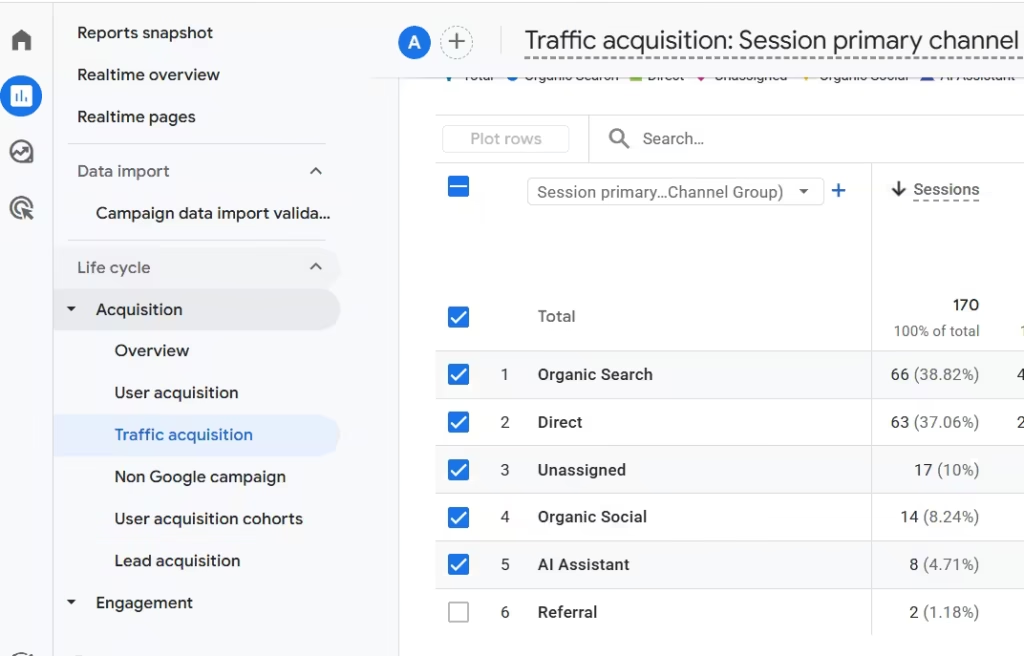
How to Check AI Assistant Traffic in Your Own GA4
Curious if this is happening on your own website? Here’s exactly where to look:
- Log into your GA4 property
- Go to Reports on the left sidebar
- Click Acquisition → Traffic Acquisition
- Look at the “Session default channel group” or “Session source” column
- See if “AI Assistant” appears as one of the rows
If you see even a small number of sessions under this label, that means real people are already discovering you through AI tools, even if you never intentionally optimized for it.
Even a handful of sessions is worth paying attention to, because this number is only going to grow from here.
Why This Matters for Your SEO & Marketing Strategy
The truth is, most businesses are still only thinking about ranking on Google. But your customers have already started asking AI tools questions instead of typing them into a search bar.
This means there are now two different games to win
- Traditional SEO — ranking well on Google, Bing, etc.
- AI visibility (also called AEO or GEO) — making sure AI tools actually pick your website as a source and mention you in their answer.
Traditional SEO vs AI SEO (AEO/GEO) — Key Differences
| Factor | Traditional SEO | AI SEO (AI Search Optimization / AEO / GEO) |
|---|---|---|
| Main Goal | Rank higher on search engine result pages (SERPs) | Get mentioned, cited, or recommended in AI-generated answers |
| Search Platforms | Google Search, Bing, Yahoo | ChatGPT, Google AI Overviews, Perplexity, Gemini, Copilot and other AI assistants |
| Primary Focus | Optimizing websites for search engine algorithms | Optimizing content for AI understanding and recommendation |
| Search Intent | Targets keywords users type into search engines | Targets questions, conversations, and user problems |
| Keyword Strategy | Focuses on exact-match and related keywords | Focuses on topics, entities, context, and natural language queries |
| Content Style | Blog posts, landing pages, service pages optimized around keywords | Answer-focused content that directly solves questions with clear explanations |
| Content Structure | Headings, keywords, internal links, metadata | FAQs, structured answers, expert insights, statistics, clear entity information |
| Ranking Factor | Backlinks, technical SEO, content quality, domain authority, Core Web Vitals | Content accuracy, authority, trust signals, structured data, brand mentions, expert information |
| User Journey | User searches → clicks website → reads content | User asks AI → AI summarizes information → user may visit recommended sources |
| Traffic Source | Mainly organic clicks from search engines | AI referrals, citations, brand mentions, zero-click visibility |
| Schema Usage | Helps search engines understand pages | Helps AI systems understand entities, services, products, and relationships |
| Link Building | High-quality backlinks are important ranking signals | Brand mentions, citations, digital authority, and trusted references become more important |
| Content Optimization Example | “Best Digital Marketing Agency in Pune” | “Which digital marketing agency in Pune is best for small businesses and why?” |
| Measurement Metrics | Rankings, impressions, clicks, CTR, organic traffic | AI mentions, AI referral traffic, citations, brand visibility in AI answers |
| Technical Requirements | Site speed, mobile-friendly design, crawlability, indexing | SEO foundation + structured data + clear entity information + AI-friendly content |
| Competition | Competing for Google rankings | Competing to become a trusted source selected by AI models |
| Future Importance | Still essential for website visibility | Growing because users are increasingly using AI assistants for search |
These two are related, but they are not the same thing. You can rank #3 on Google for a keyword and still be completely invisible when someone asks an AI assistant that exact same question. Why? Because AI tools don’t just look at ranking, they look at how clear, trustworthy, and well-structured your content is before they decide to cite it.
This is exactly why more marketers are now talking about things like:
- Schema markup (structured data that helps machines understand your content, not just humans)
- E-E-A-T (Experience, Expertise, Authoritativeness, Trustworthiness Google and AI tools both care about this)
- Topical authority (covering a subject deeply, not just writing one random blog post about it)
If your website isn’t built with these in mind, AI tools simply won’t have a reason to trust you enough to recommend you.
How to Optimize Your Website to Get More AI Assistant Traffic
If you want more of this AI Assistant traffic (and you should, because it’s only growing), I have listed some simple, practical steps:
- Add schema markup to your website. This is like giving AI tools a clear, labeled map of your content, who you are, what you offer, your location, reviews, and more.
- Write content that directly answers questions. AI tools love clear, direct answers. If someone asks “what is the best time to visit a physiotherapist after an injury,” your content should answer that question clearly, in simple language, near the top of the page.
- Build topical authority. Don’t just write one article about a topic. Cover it from multiple angles, different questions, different formats (FAQs, guides, comparisons), so AI tools see you as a genuine expert on the subject.
- Strengthen your E-E-A-T signals. Add author bios, real credentials, genuine client testimonials, and case studies. AI tools are more likely to cite sources that look credible and human-backed, not generic or AI-written filler content.
- Keep your content fresh and updated. AI tools tend to favor content that’s recently updated over old, stale pages sitting untouched for years.
F.A.Q.
Supporting Subheading
Yes. It usually means AI tools already see your website as a trustworthy source. That’s a strong signal that your SEO fundamentals content quality, structure, and authority are working well.
No, GA4 tracks it as its own separate channel now, distinct from Organic Search. This helps you understand exactly how much of your traffic is coming specifically from AI tools versus traditional search.
Almost certainly, yes. As more people rely on AI tools daily for quick answers and recommendations, this traffic source is expected to become a bigger and bigger share of overall website traffic over the next few years.
Not exactly. AI Assistant is the umbrella category. ChatGPT, Perplexity, Gemini, and Copilot all fall under it. If you want to see traffic from one specific tool like ChatGPT, you may need to look at the Session source column instead of just the channel group, since that breaks it down tool by tool.
Right now, for most websites, AI Assistant traffic is still much smaller than traditional Google organic traffic. But it’s growing fast month over month, so even a small number today is worth tracking closely instead of ignoring.
Want to know if AI tools are already sending traffic to your website?
Get in touch with SpyraaBizz for a free AI-visibility audit of your website. We’ll check your current AI Assistant traffic, review your schema and content structure, and give you a clear action plan to show up more in AI search results.